I Just Shipped My React Native App — Here Are 10 Things That Made a Real Difference
In this article+
- 1. react-native-keyboard-controller instead of KeyboardAvoidingView
- 2. react-native-draggable-flatlist with ScaleDecorator
- 3. expo-speech-recognition for voice input
- 4. expo-glass-effect for iOS 26 Liquid Glass
- 5. babel-plugin-react-compiler
- 6. Receipt scanning with Gemini Vision API
- 7. Lottie for micro-interactions, not just onboarding
- 8. @shopify/react-native-skia for animated mesh gradients
- 9. expo-haptics, but use the right feedback type
- 10. Smooth number animations with Reanimated's useAnimatedReaction
So I recently published one of my React Native apps (finance/budgeting app, Expo-based) and wanted to share some of the tools and approaches that genuinely helped. Not the obvious stuff everyone already knows, but things I wish someone told me earlier.
1. react-native-keyboard-controller instead of KeyboardAvoidingView
If you've ever fought with the built-in KeyboardAvoidingView, just drop it. This library handles keyboard behavior properly on both platforms. Wrap your app with
2. react-native-draggable-flatlist with ScaleDecorator
Needed users to reorder their accounts and budgets by dragging. This library is basically a FlatList but draggable. The nice touch is wrapping each item in
3. expo-speech-recognition for voice input
I wanted users to add transactions by voice ("spent 50 on coffee"). This package made it dead simple, one line to start, supports multiple languages, gives you interim results in real time. No need to mess with native modules or external APIs for the speech-to-text part.
4. expo-glass-effect for iOS 26 Liquid Glass
If you're on Expo SDK 54, you can use isLiquidGlassAvailable() to check if the device supports liquid glass and conditionally render native tabs vs your classic tab bar with BlurView. Your app looks modern on new devices and still works fine on older ones.
5. babel-plugin-react-compiler
Still in beta but already usable. It auto-memoizes your components and hooks at build time. I was manually writing useMemo and useCallback everywhere, now the compiler handles most of it. Just add it to your babel config and let it do its thing.
6. Receipt scanning with Gemini Vision API
This one was fun. User takes a photo of a receipt, I convert it to base64 and send it to Gemini as inline image data. The trick is asking it to extract individual line items, not just the total. So a grocery receipt becomes 5 separate transactions, each auto-categorized from the user's own category list. The prompt engineering matters a lot here, you have to be very specific about the output format or the AI gets creative.
7. Lottie for micro-interactions, not just onboarding
Everyone uses Lottie for splash screens and onboarding. I used it for tiny mood emojis on transactions, each mood (happy, stressed, neutral...) has a small 18x18 looping Lottie animation. Way more alive than static emoji. The key is keeping the JSON files small and using autoPlay loop.
8. @shopify/react-native-skia for animated mesh gradients
I wanted an animated gradient background (like the ones you see in modern fintech apps). Used Skia's shader support to write a custom GLSL mesh gradient that animates on the UI thread. The trick for performance is undersampling, render the shader at half resolution and scale it up. Users can't tell the difference and you save a ton of GPU work.
9. expo-haptics, but use the right feedback type
Don't just use one haptic style everywhere. There are different ones for a reason: - selectionAsync() for toggles and filter chips (light tap) - impactAsync(Medium) for button presses - impactAsync(Heavy) for destructive actions or long press - notificationAsync(Success) for confirmations
Small detail but users notice it subconsciously. Makes the whole app feel more "real".
10. Smooth number animations with Reanimated's useAnimatedReaction
For things like balance totals or chart values, I animate the number counting up/down instead of just snapping to the new value. The trick is using useAnimatedReaction to watch a shared value on the UI thread and push updates back to JS via runOnJS. You get a smooth 60fps counting effect without re-rendering your component on every frame. Works great for any kind of numeric display.
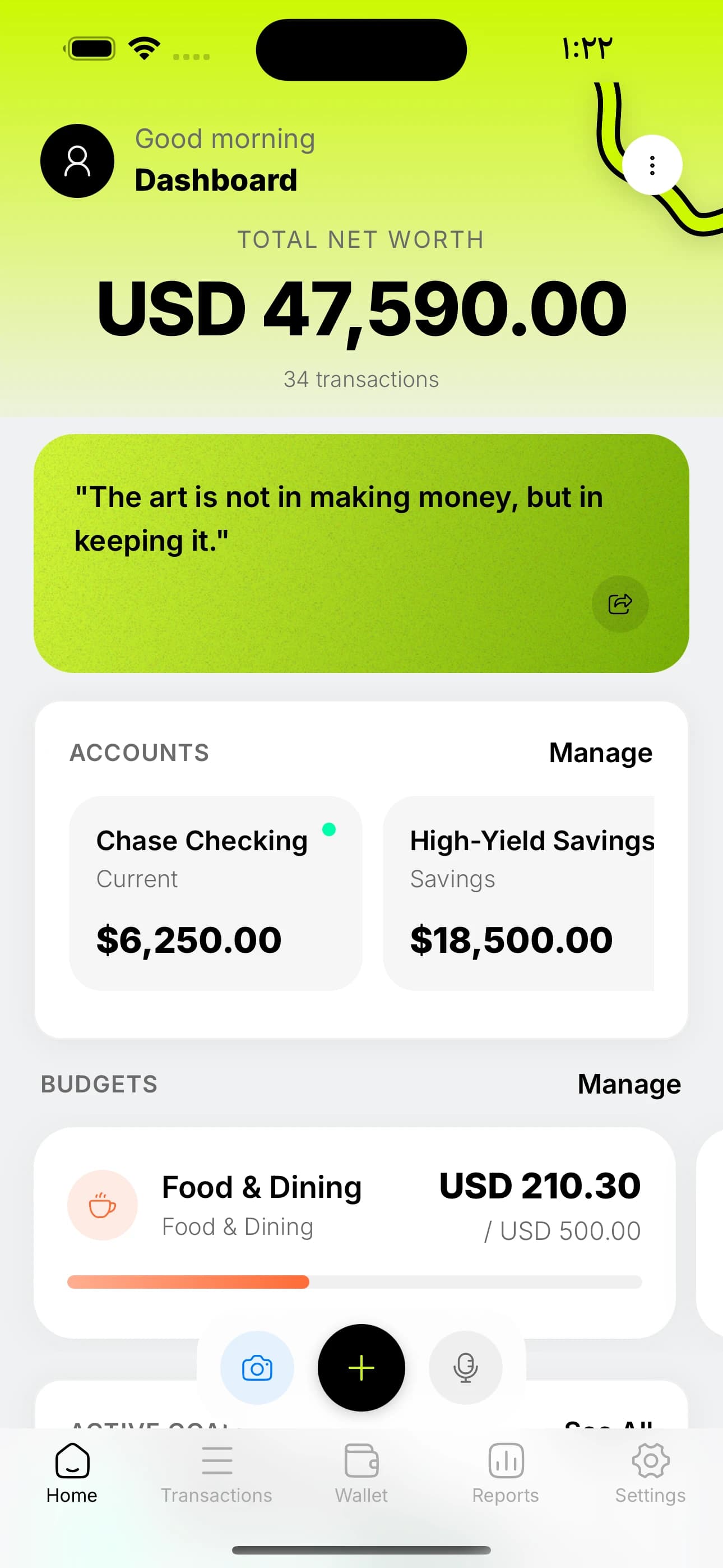
These are the tools and patterns that made the biggest difference in shipping Cashy. If you're building a React Native app — especially a finance or productivity app — I hope some of these save you the hours of trial and error I went through.